For Mac and Windows
Your AI, on your computer.
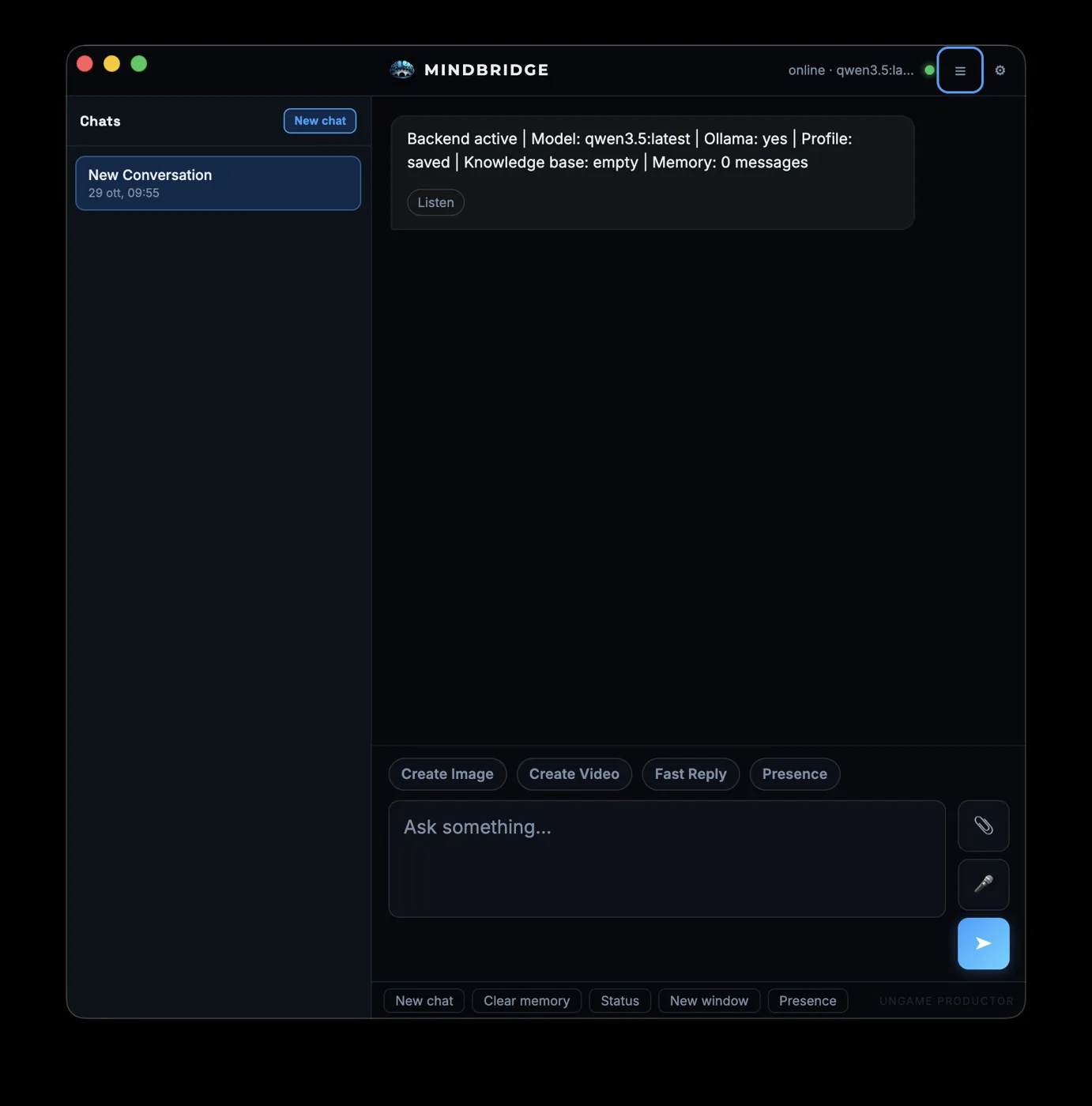
MindBridge is a local AI assistant for Mac and Windows, powered by Ollama. Summarize a document, find a file, or ask without leaving the app you are in. Local chat runs on your computer. Cloud tools stay off until you turn them on.
What you use it for
The client document.
Drop in a PDF, a Word file, or a note. Ask for a summary. For local chat, that file stays on the computer.
The missing file.
Ask where a document went. MindBridge searches folders you can already open. Delete, overwrite, and bulk changes wait until you confirm.
The app you are already in.
A shortcut opens MindBridge over your work. You ask, close it, and continue. On Windows and Linux-style keyboards the overlay is Ctrl+Shift+Space. On a Mac it is Control+Shift+Space.
More than a chat window
These are in the app today. Each one runs on your computer unless the line says it is optional.
Chat that is still there tomorrow.
Streaming replies, a Thinking panel with safe steps, and conversation history saved on the computer.
Your documents.
A knowledge base on disk for notes, PDF, Office, and text. You can also attach a file in the chat.
Files, with a stop.
Search by name or inside a document, copy, organize, and rename. Delete and bulk changes wait for a yes.
Voice on the machine.
Dictation and read-aloud are included. No separate install. Presence is a full-screen voice mode: the microphone is on only while MindBridge is listening. Presence talks. It does not edit files from that screen.
Pictures, understood locally.
Looking at a photo uses a local model. An optional NVIDIA key can add a cloud boost, and that boost stays off until you add the key. Making an image can stay on the computer if you already run ComfyUI or Stable Diffusion, or use an online tool you turn on yourself.
Your language and your desk.
The interface is in English, Italian, Spanish, French, German, Portuguese, Japanese, and Simplified Chinese. Local reminders and a standard calendar file. No Google login. Reminders appear while MindBridge is open.
Local video exists and stays off until you enable it. It needs ComfyUI already open and a model download you confirm. There is no online video.
You choose what leaves the computer
The model runs here.
Local answers use Ollama on your Mac or PC. Ollama is free. MindBridge does not charge you per reply.
Cloud is a switch.
Web search, online images, and the optional NVIDIA boost stay off until you turn them on. A local-only switch turns those network tools off.
Local does not mean every button works on a plane.
Chat and files on the machine work after Ollama and a model are installed. Anything you have switched on that needs the internet still needs the internet.
Read the Privacy Policy.
Made for work you would not paste into a website
People with client files.
Drafts, research, and documents stay on the computer for local chat.
Writers.
A fiction or non-fiction setup, and the thread is still there tomorrow.
People who already run local models.
A desktop around the model: files, a knowledge base, an overlay, and voice.
If you want a huge hosted model and no install, this is the wrong app. MindBridge asks you to install Ollama. The app guides that step. Linux is not available.
See it in action
Three steps, then it is yours
Install MindBridge on a Mac or a Windows PC. You do not install Python.
Install Ollama and download one model. 16 GB of RAM is comfortable. 8 GB is the minimum and should use a small model. The app shows the download.
Turn on a cloud tool only when you want it.
Get MindBridge
Downloads are not open yet. Join the waitlist to hear first.
Windows
macOS
“I summarized a client document on my own PC. Nothing was uploaded.”
Questions
Is MindBridge a website?
No. It is an app you install on a Mac or a Windows PC. This page is the product site.
Do I need ChatGPT or an API key?
No. Local chat uses Ollama on your computer. You install Ollama, then download a model once.
Does it work without internet?
Local chat and files already on the machine do, after Ollama and the model are installed. Tools you have turned on that use the network need a connection.
Do my files leave the computer?
Not for local chat, the knowledge base, or file actions. Something goes online only if you enable an optional cloud tool.
Can it change my files by itself?
It can create and organize files when you ask. Delete and bulk changes wait until you confirm.
Does the waitlist mean I get the beta?
No. You get release news. It does not reserve a copy, a date, or a discount.
When can I download it?
There is no public download on this page. Join the list and we will write when a release is ready.
Be first to hear when it is ready
Leave your email for release news. You can unsubscribe at any time.